|
1
|
|
|
2
|
- Focus on skills needed for working with Fusion technologies
- Wednesday’s session contains more about the actual technologies
- Relate one example of an Oracle shop converting to these technologies
- Successes
- Lessons learned
- Transmit information that can help your transition into this world
- 10:30 and 1:30 sessions on
Wednesday focus on techniques
|
|
3
|
- Quiz questions
- ADF Business Components
- ADF Faces RC and ADF Model
- ADF Task Flow
- How one shop integrated all of this
|
|
4
|
- “It’s a floor wax and a dessert topping!”
- Fusion Applications
- Next version of E-Business Suite (Apps)
- Fusion Middleware
- Tools for building and running
the applications (and your
custom apps)
- Fusion Architecture
- How to assemble various
technologies to build FA
- How to connect FM pieces
|
|
5
|
- Application Development Framework
- Available in JDeveloper (10g, 11g)
- Common method for working with various technologies
- Easily connects the layers of the app
- Database
- User interface and bindings
- Controller
- Implies certain technologies
|
|
6
|
- Core technologies used to create Fusion Applications
- ADF Business Components
- ADF Faces Rich Client
- ADF Controller
- Other high-level technologies
or strategies also used
- SOA, ESB, Business Rules,
WebCenter
- Need to look into those, too,
at the architecture level
|
|
7
|
|
|
8
|
- Quiz questions
- ADF Business Components
- ADF Faces RC and ADF Model
- ADF Controller
- How one shop integrated all of this
|
|
9
|
- ADF BC
- Persistence
- Storing data in and retrieving data from a database
- O/R mapping
- Translating relational database thingies to object-oriented (Java)
whatsits
- Handles mechanics of creating
SQL statements and of
communicating with the database
|
|
10
|
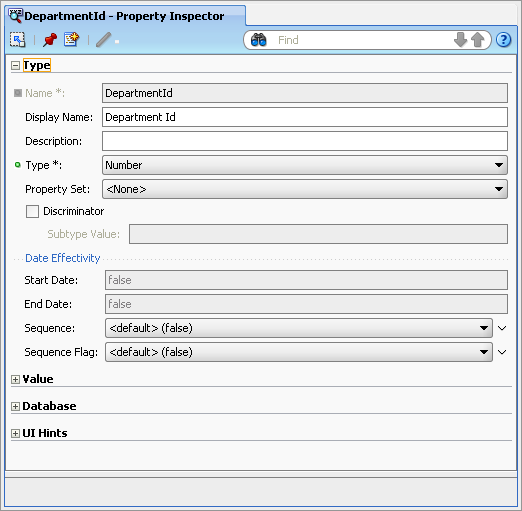
- Good working knowledge of the features of this framework
- Entity objects for database views or tables
- View objects for queries
- View links for master-detail coordination
- Declarative validation
- Declarative UI hints
- Declarative LOVs
- Declarative query criteria
- Light to no Java
- Minimal to no Groovy
|
|
11
|
- Arguably more productive
- Leverages native strengths of the frameworks
- All frameworks can be extended
- The less you extend the better
- You can blame the framework for problems
- Version upgrades are potentially easier
- You take advantage of framework
bug fixes automatically
- Same concept as database
upgrades
|
|
12
|
|
|
13
|
- Quiz questions
- ADF Business Components
- ADF Faces RC and ADF Model
- ADF Controller
- How one shop integrated all of this
|
|
14
|
- Components used to define the user interface
- Nearly 150 “tags”
- JavaServer Faces (JSF) compliant
- Run in a JSF environment – JSF servlet
- Includes “rich” behavior
- Components react to user interaction before the page is resubmitted
- A.k.a., PPR, AJAX
- Partial Page Rendering
- Asynchronous JavaScript and XML
|
|
15
|
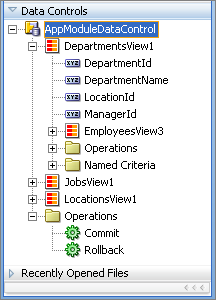
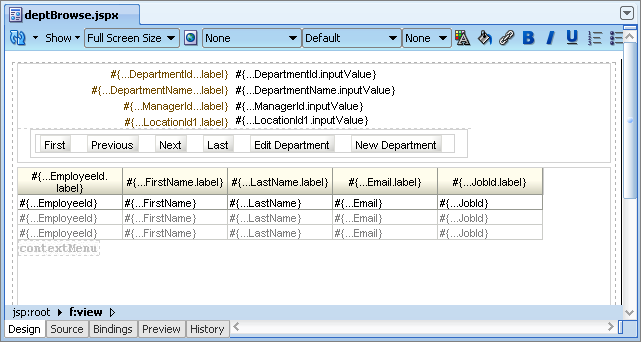
- ADF Data Controls
- Provides list of components or groups of components for a node in the
data model
- “Drop as” options
- ADF Bindings
- Prebuilt connection from
the ADF BC to the UI
- Drag and drop action
above does the work
|
|
16
|
- How to work with drag and drop features in JDev
- XML at a reading level
- Code is XML-based
- Declarative mostly
- You may occasionally want to type into the source code
- Java for “backing beans” work
- To define special behavior for buttons, for example
- Expression Language (EL) to define
values for XML element attributes:
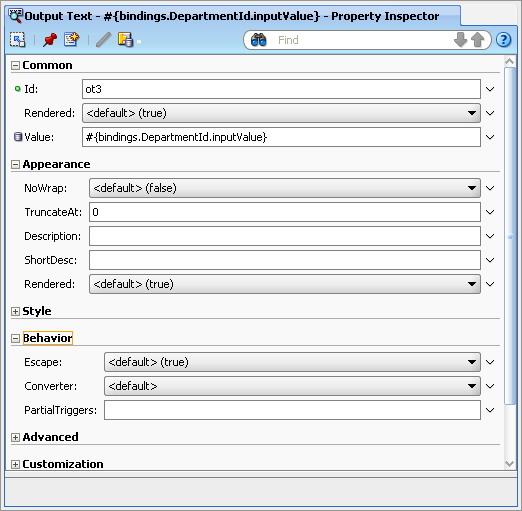
- #{bindings.DepartmentId.inputValue}
|
|
17
|
|
|
18
|
- Quiz questions
- ADF Business Components
- ADF Faces RC and ADF Model
- ADF Controller
- How one shop integrated all of this
|
|
19
|
- Supplement to standard JSF Controller functionality
- Declares which page to display next
- Can be based on a condition
- Treats part of a page in the same way as a full page in normal JSF work
- Only part of a page is rendered, the rest stays put
- Speeds up page processing
- Allows reuse of page parts
- Allows logic to be added to the flow
- For example, conditional display of a page
|
|
20
|
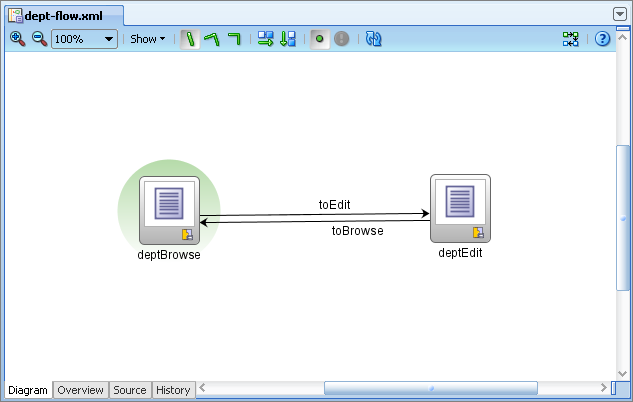
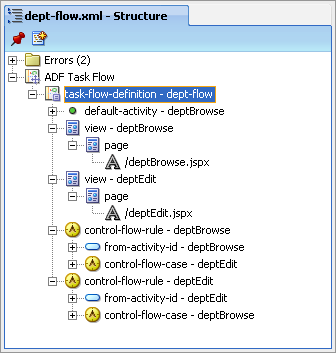
- Standard development motions for editing the flow diagram
- adf-config.xml or individual flow files
- For example, dept-flow.xml
- How to construct page based on “fragments”
- Lightweight Java for manipulating
the standard flow
|
|
21
|
|
|
22
|
- Quiz questions
- ADF Business Components
- ADF Faces RC and ADF Model
- ADF Controller
- How one shop integrated all of this
|
|
23
|
- The organization
- New York State agency: Office of Alcoholism and Substance Abuse
Services (OASAS)
- The application
- Federally required reporting system for all patient admissions and
discharges into substance abuse treatment programs
- Statewide application involving 1,200 government, private and nonprofit
programs
- Approximately 400,000 transactions
per year – primarily entered online
- Character-mode Forms 6i run in a telnet
client session
|
|
24
|
- Staff consisted of Oracle Forms and PL/SQL developers
- Unaware of Java EE coding styles
- Training on new tools and languages early in project
- On site “mentors”
- Java architect to answer questions
and to do the “hard stuff”
- “Recipes” for specific tasks
|
|
25
|
- Settling on Fusion technologies (9i and 10g versions, actually) as the
technology stack
- Primarily declarative programming, little Java
- “The Oracle Path” – Oracle was/is using them
- ADF in JDev, UIX, ADF Faces, ADF BC, Struts, JSF
- Rewriting all application code
- Moving Forms business rules logic to the database
- Rewriting character mode reports
in Oracle Reports
- Integrating web application
security
|
|
26
|
- Somewhat apprehensive staff was productive
- New is always scary but in a fun way
- Mentoring strategy empowered staff for future work
- Pre-project training addressed project requirements
- Database code orientation side effect:
- Mentoring included “recipes” for
frequently-performed tasks
- Create a form
- Create a report
- A resident Java architect is a must
|
|
27
|
- Technology choices proved solid
- Fusion technologies and database-centric code
- ADF Business Components presented no major surprises
- JDBC layer worked
- Published techniques for application context and user connections
worked
- View and Controller technologies did their job
- Used Browser Look and Feel
- Upgrades to new versions (post 9i)
have been a real challenge
- Technology shift from UIX to JSP to JSF
|
|
28
|
- Plan for staff skills transition time
- Specific training followed up with project work helps
- Big Bang training (all features at one) does not work well
- Feed in new techniques a little at a time
- Particularly important:
- Scale initial tasks so they can be
successful
- A sense of accomplishment is a key
learning technique
|
|
29
|
- Full application rewrites cannot “leave everything the same”
- Budget for some redesign time
- Database structures can and should change
- Design around native features
- Frameworks work best when you
leverage their strengths
- Avoid overriding framework classes if
at all possible
- Stick with default page flow
- Upgrades will be easier
- The simpler the better
|
|
30
|
- You can be quite productive with Fusion technologies using ADF
declarative and visual programming
- You need to know basic ADF mechanics
- How its frameworks work
- The developer experience
- Thinking in an ADF way
- You need to know a bit about Java
and some other languages
- And rely on a Java architect
- You need to keep learning
|
|
31
|
|

 Notes
Notes