|
1
|
- Dr. Paul Dorsey & Michael Rosenblum
- Dulcian, Inc.
- www.dulcian.com
- June 23, 2009
|
|
2
|
- We are solving the wrong problem.
- Tuning:
- Usually makes the database run better.
- Focuses on poorly running SQL.
- Web applications are frequently unaffected by these performance
improvement approaches.
- Need to examine the entire system, not just the database.
|
|
3
|
|
|
4
|
|
|
5
|
- Less common cause of performance problems
- Transmitting large amounts of information over the Internet may cause
problems.
- Uploading large files
- Transmitting a large block of data
|
|
6
|
- Processing can be resource-intensive.
- Java programmers minimize database application logic in the middle tier.
- Complex data manipulation can be handled much more efficiently with
database code.
- Thick database approach is the key to efficiently performing web
applications.
|
|
7
|
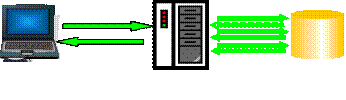
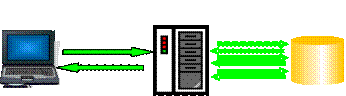
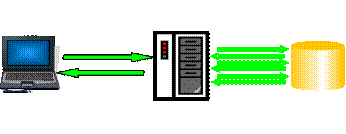
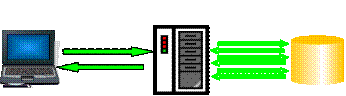
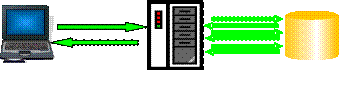
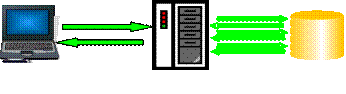
- Not instantaneous (but really fast)
- High number of transmission requests are the #1 cause of performance
problems.
- Database-independence is not a good idea.
- Single request from a client may require many requests from the
application server to the database in order to fulfill.
- Examine and measure the number of round-trips from application server to
database.
|
|
8
|
- Use traditional tuning.
- Beware of stateless implementation.
- Information pertaining to a particular session must be retrieved at the
beginning of every request and persistently stored at the end of every
request.
- Single table may generate massive I/O
- Redo logs
- Block contention
|
|
9
|
- Rare problem
- Beware of unnecessary data movement.
- One record is needed and the whole table is sent.
|
|
10
|
- #2 cause of performance problems
- Keep pages small.
- Not too many fields
- Not too much AJAX or JavaScript
- Not too big a tree
- Not too much data in a scrolling block
- No images, or other unnecessary information
- Measure size of page.
|
|
11
|
- Embed timers into a system to detect where in the nine possible steps
the application performance is degrading.
- Strategically placed timers will indicate how much time is spent at any
one of the steps in the total process.
|
|
12
|
- The most common causes of slow system performance are:
- 1. Excessive round-trips from the application server to the database
- 2. Large pages sent to the client
- 3. Performing operations in the application server that should be done
in the database
- 4. Poorly written SQL and PL/SQL routines
|
|
13
|
|
|
14
|
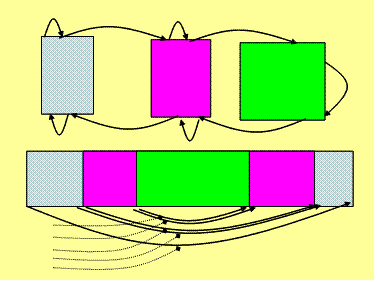
- Command: Atomic part of the process (any command on any tier)
- Step: Complete processing cycle in one direction (always one-way)
- Can either be a communication step between one tier and another, or a
set of steps within the same tier.
- Step consists of a number of commands.
- Request: Action consisting of a number of steps. A request is passed
between different processing tiers.
- Round-trip: Complete cycle from the moment the request leaves the tier
to the point when it comes back with some response information.
|
|
15
|
|
|
16
|
- Client Level
- 1. From request initiation to end of processing
- User clicks button
- Response is displayed
- 2. From request to application server to response receipt
- Start of servlet call
- End of servlet call
|
|
17
|
- Still to discuss
- SQL tuning
- Application server / database communication tuning
- Managing persistent layer
- Topics Covered
- Steps in web application process
- Places where performance can suffer
- Measuring performance
|
|
18
|
- 1. Use bind variables.
- 2. Use bind variables.
- 3. Use bind variables.
- 4. Use bind variables.
- 5. Use bind variables.
- 6. Use bind variables.
- 7. Use bind variables.
- © Tom Kyte
|
|
19
|
- The problem:
- Value lists are explicitly hard-coded across the system
- Difficult to determine what exactly is used
- Hard to maintain
- Data-dependent (cannot be cached)
- The solution – single tuning point!
- Universal Value List Builder
|
|
20
|
- Specify exactly what is needed as output and declare the corresponding
collection:
- Create type lov_oty is object
- (id_nr NUMBER,
- display_tx VARCHAR2(256));
- Create type lov_nt
as table of lov_oty;
|
|
21
|
- Write a PL/SQL function to hide all required logic:
- function f_getLov_nt
- (i_table_tx,i_id_tx,i_display_tx,i_order_tx)
- return lov_nt is
- v_out_nt lov_nt := lov_nt();
- begin
- execute immediate
- 'select lov_oty('
-
||i_id_tx||','||i_display_tx||
')'||
- ' from '||i_table_tx||
- ' order by '||i_order_tx
- bulk collect into v_out_nt;
- return v_out_nt;
- end;
|
|
22
|
- Test SQL statement with the following code:
- select id_nr, display_tx
- from table(
- cast(f_getLov_nt
- (:1, -- 'emp'
- :2, -- 'empno'
- :3,
--'ename||''-''||job'
- :4 -- 'ename‘
)
- as lov_nt)
- )
|
|
23
|
- The problem:
- Users upload CSV-files
- Name of file defines type
- Column headers map directly to table columns.
- One row of file could mean multiple inserts
- Wrong solution
- Parse file in the middle-tier and build inserts.
- Right solution:
- Load file to the database as CLOB.
- Build all inserts in the database.
|
|
24
|
- Declare
- type integer_tt is table of
integer;
- v_cur_tt integer_tt;
- Begin
- for r in v_groupRow_tt.first..v_groupRow_tt.last loop
- v_cur_tt(r):=DBMS_SQL.OPEN_CURSOR;
- for c in c_cols(v_mapRows_tt(r))
loop
- for i in
v_header_tt.first..v_header_tt.last loop
- if
v_header_tt(i).text=c.name_tx then
- v_col_tt(i):=c;
-
v_col_tx:=v_col_tx||','||v_col_tt(i).viewcol_tx;
-
v_val_tx:=v_val_tx||',:'||v_col_tt(i).viewcol_tx;
- end if;
- end loop;
- end loop;
- v_sql_tx:='insert into
'||v_map_rec.view_tx||
- '('||v_col_tx||')
values('||v_value_tx||')';
-
DBMS_SQL.PARSE(v_cur_tt(r),v_sql_tx,DBMS_SQL.NATIVE);
- end loop;
|
|
25
|
- for i in 2..v_row_tt.count
- loop
- for r in
v_groupRow_tt.first..v_groupRow_tt.last
- loop
- for c in
v_col_tt.first..v_col_tt.last
- loop
- if v_col_tt(c).id = v_mapRows_tt(r) then
-
DBMS_SQL.BIND_VARIABLE(v_cur_tt(r),
-
':'||v_col_tt(c).viewcol_tx,
- v_data_tt(c).text);
- end if;
- end loop;
- v_nr:=dbms_sql.execute(v_cur_tt(r));
- end loop;
- end loop;
|
|
26
|
- Critical success factor – managing database sessions:
- Almost impossible to have one session per connection
- Cost of opening/closing sessions is high.
- Opportunity:
- Total number of physical sessions at any point in time is fairly small.
- Good idea:
- Create connection pool with a fixed number of connections (using
Autoextend option).
- Serve them to incoming requests as needed.
- Problems:
- A single physical session can serve requests from different logical
sessions at different points in time.
- Cannot trust ANYTHING defined at the session level.
|
|
27
|
- Packaged variables cleanup
- begin
dbms_session.reset_package;
dbms_session.free_unused_user_memory;
- end;
|
|
28
|
- Temporary tables cleanup
- procedure p_truncate is
- v_exist_yn varchar2(1);
- Begin
- select 'Y' into v_exist_yn
- from v$session s,
v$tempseg_usage u
- where s.audsid =
SYS_CONTEXT('USERENV','SESSIONID')
- and s.saddr = u.session_addr
- and u.segtype = 'DATA'
- and rownum = 1;
- for c in (select table_name from
user_table
- where temporary = 'Y‘
- and duration =
'SYS$SESSION') loop
- execute immediate 'truncate
table '||c.table_name;
- end loop;
- end;
|
|
29
|
- Web - idea
- Create persistent table
- Estimate system could slow down 3-5%
- Web - real life
- 50%-200% slower
(only at peak times)
- Workload limit after which the whole system started to fall apart
- Client/Server
- Temporary table with supporting information
(one row per session)
- Read - from support area.
- Write – via the engine:
- Get action from the application
- Modify support area
- Send response to the application
- Reason
- Eliminates about 75% of repeated requests
|
|
30
|
- Database running in ARCHIVELOG
- All DML against SUPPORT table recorded
- Filled up about 85% of all logs!
- All support changes must be persistent.
- Extra COMMITS occurred
- LOG FILE SYNC wait event count skyrocketed
- Table had primary key (ID from a sequence)
- Due to DML activity from hundreds of sessions, every 15 minutes, the
database logged a deadlock.
- Very high contention on some index blocks
|
|
31
|
- Cumulative heavy I/O load
- Individual requests take more time.
- Sessions were not released from connection pool fast enough.
- Total number of simultaneous sessions is 4 times more than estimated.
- Each session used more memory, more temporary segments, etc.
- Slowed down the system even more
- Especially true for I/O operations (since there were more simultaneous
requests).
- Quickly spirals into a slow-down and eventual stoppage of the system
|
|
32
|
- Database resources quickly became over-utilized just by making a table
persistent with a session key.
- Two core issues:
- 1. How to decrease I/O?
- 2. How to resolve index contention?
|
|
33
|
- Create a separate database instance
- New instance runs in NOARCHIVELOG mode
- New instance has only one schema.
- That schema contains only one table: SUPPORT INFO
- SUPPORT INFO table is hash-partitioned by session ID (1024 partitions)
- All indexes are local.
- Main schema has a database link and synonym
- Everything appears as though nothing has changed.
- All requests to the support table must include session ID (to use local
indexes).
- Some rewrite was required to enforce this rule.
|
|
34
|
- System ran as fast as originally predicted.
- Extra waits caused by data cases via DBLink were negligible (less than
0.01/request - average of 3000 requests/hour).
- No time lost writing logs
- Less I/O à
less sessions à less resources used à less waits à faster response à less sessions …
- Using a large number of partitions, less chances of creating a “hot
block”, since all indexes were local.
- Lessons learned:
- In the Oracle environment, everything is linked together.
- Any changes can lead to a “domino effect.”
|
|
35
|
- Keep all nine of the potential areas for encountering performance
problems in mind.
- Investigate each one carefully to discover ways in which performance can
be improved.
- It is not just the database.
|
|
36
|
- Full business rules-based development environment
- For Demo
- Write “BRIM” on business card
|
|
37
|
- Dr. Paul Dorsey – paul_dorsey@dulcian.com
- Michael Rosenblum – mrosenblum@dulcian.com
- Dulcian website - www.dulcian.com
|

 Notes
Notes