|
1
|
|
|
2
|
- Service-Oriented Architectures (SOAs) are typically used for
transferring data between larger systems and subsystems.
- Defining a series of services to support a system’s business needs can
be adapted to provide SOA benefits at the application level.
- Typical database-driven application, database/UI interaction is made
possible by the middle tier:
- Performs DML operations and queries data
- Data packaged using a specific architecture and language
- Locks UI, middle tier, and database together
|
|
3
|
- Using SOA, you can decouple the UI, middle tier and database which
allows:
- UI and database developers to isolate their respective code.
- Independent implementation of the system front and back-ends.
- A larger portion of the application logic and business rules can be
placed in the database.
- XML is an efficient transport medium for data passed between front and
back-ends of a system using a SOA approach.
|
|
4
|
- The de-facto standard for web-based systems is a three tiered
architecture:
- 1. Database acts as a data store.
- 2. Application server handles processing of user requests and compiling
of the user interfaces.
- 3. Client renders the user interface and provides user interaction in a
web browser or a custom client application.
|
|
5
|
- Using Oracle Application Development Framework (ADF) Faces architecture
- Costly and time-consuming to migrate to a different architecture.
- Each new incarnation requires rewriting existing applications.
- No well defined boundaries or interfaces in these architectures between
the middle tier/database and the middle tier/client.
- Avoid this problem by creating system boundaries using well-defined
services or APIs to link the different parts together.
- Using this approach, any one of the tiers can be swapped out with
little or no modification of the others.
|
|
6
|
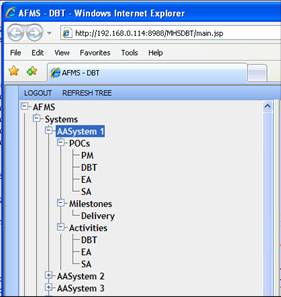
- Tree component is an excellent use case to examine
- Powerful navigational aide
- Includes a lot of functionality
- Can be broken down into simple discrete actions (expanding a node,
selecting a node, and right-clicking a node)
- Develop a service to support each functionality
- Allows tree component to communicate with the system back-end and
perform the appropriate actions.
- Define tree component as an interface instead of as an instance of an
implementation in another framework
- Provides flexibility to determine the look-and-feel of the front-end
- Allows selection of appropriate architecture for front-end/middle
tier/back-end.
- Ability to plug in substitutes for each tier without refactoring entire
system.
- Only some core components need to be modified to work with substituted
section.
|
|
7
|
|
|
8
|
- Typical system design:
- Interface between the middle tier and database = standard database
connection.
- Developers need detailed knowledge of the database structure.
- Requests are processed by:
- Having the middle tier accept a request
- Making decisions about what should happen next
- Making frequent requests to the database for more information.
|
|
9
|
- Approach assumes that middle tier developer has specific knowledge about
the database syntax and the data model.
- Approach is valid, but limits modularity of system.
- If data model changes, middle tier will have to be refactored and
retested to support the new structure.
- Using tree component example, typical design methodology requires the
middle tier developer to understand which tables hold the information
for each of the nodes and how those records are linked together in
order to form the hierarchy.
|
|
10
|
- Alternative "SOA-like" approach to handling the middle
tier/database interface:
- 1. Define specific APIs to handle different types of requests.
- 2. Middle tier developer only needs to know what functions to call in
the database and the input parameters.
- Changes to the data model should not affect the middle tier.
- Lack of interdependency involves moving the business logic, process
flow, and screen definitions into the database.
- Otherwise, number and complexity of APIs will be too great to be
useful.
- This type of middle tier:
- Defines services available to the UI
- Handles requests to the database for processing and sending the results
back to the client for rendering and input
- Acts more as a conduit between the client and the database.
|
|
11
|
- Client makes a request to the middle tier service to build the tree
- Middle tier:
- Performs authentication
- Forwards the request to the appropriate database API.
- API defined as a single database function for all tree actions with the
following input parameters:
- 1) Unique session identifier - Used to track user session/current state
of tree
- 2) User identifier
- 3) Type of tree - Used to support multiple types of trees for a single
user
- 4) Action requested - In this case the action is to build a new tree
- Database:
- Processes request internally
- Determines the hierarchical structure of the tree for this user
- Generates response passed back to the middle tier.
- Middle tier:
- Forwards response back to the client
- Client:
- Performs the appropriate action identified by the database
|
|
12
|
- Includes well-defined set of interfaces between each of the tiers.
- To change application servers (Ex. OAS to IIS):
- Code new middle tier to forward request to the database.
- No need to refactor each page/screen from JSP to Active Server Page.
- To change databases:
- APIs must be implemented in the new database to process same input
parameters and generate same output format.
- Well defined actions and business rules in a repository mean that even
switching to a new database will not be that difficult because only
the engine that reads from the repository would have to be rewritten.
- To change clients:
- Refactor UI renderer
- Only core code for action processing needs to be re-implemented.
- Multiple instances used throughout application mean modifications only
need to be made once for the core renderer.
|
|
13
|
- Transport layer can be anything that satisfies requirements:
- XML Upside
- Easy to work with (human readable)
- Many mature utilities available to generate and parse XML
- De-facto standard in SOAs
- XML Downside
- Overhead associated with encoding data
- Increased data size over network
- Techniques used to overcome drawbacks:
- Shortening tag and attribute names
- Compressing XML document before transport
|
|
14
|
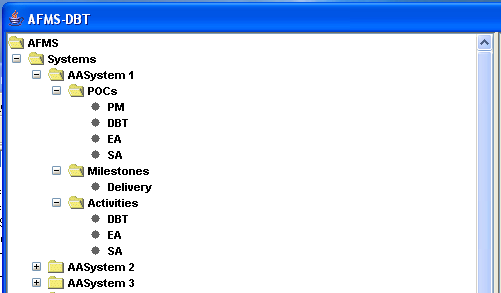
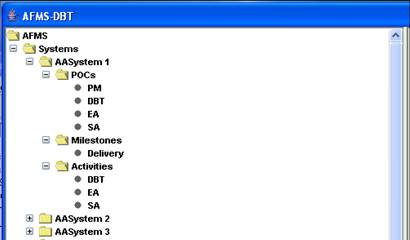
- Formatting/structure of response to request from tree component
- Resulting XML is a hierarchical structure representing parent/child
relationship of tree nodes:
- Each XML node corresponds directly to tree node with parent/child
relations
- XML document node attributes indicate properties of tree nodes
- Root node of example tree has display attribute “AFMS” used to indicate
node name
- Node ID attribute indicates unique identifier for tree node
- Can be used later to identify node upon which an action has been
performed
- Other attributes define the behavior of the tree nodes:
- Expand attribute determines whether action should always be fired to
request what nodes to show underneath, or only make request once and
cache results.
|
|
15
|
|
|
16
|
- Defined transport layer demonstrates versatility of this architecture.
- Specification for tree widget defined without regard for platform,
programming language, or implementation,
- Different implementations of the client can be coded against the same
middle tier/database without any modification of the middle tier or
database as long as they adhere to the same specifications.
|
|
17
|
- Application-level SOA approach to system design means:
- Easily replaceable and customizable user interface
- If system is already locked into a technology stack, SOA leaves options
open to switch to another stack if necessary.
- Example: JClient and web-based tree implementations were developed
separately by two different groups, neither of which had to make any
changes to the database or middle tier.
|
|
18
|
|
|
19
|
- Originally architecture and tree component were explored for a customer
with an existing JClient application that included a poorly designed
tree component.
- Minor changes resulted redeploying to several hundred users.
- To successfully replace the client-side tree, following activities had
to be supported:
- 1) Request a new tree
- 2) Expand or collapse a node
- 3) Select a node (left-click node)
- 4) Right-click node
- 5) Drag and drop a node
- 6) Select a menu item option
- Based on the action following events could happen:
- 1) Build a new tree
- 2) Replace all nodes below a node (expand node)
- 3) Insert a node
- 4) Delete a node
- 5) Update the properties of a node
- 6) Execute a custom action
|
|
20
|
- Implement functionality of original tree with new requirements without
redeploying the client code after the initial deployment.
- Implement small set of event listeners and actions.
- Use a single API as the interface.
- Only portions of the system residing on the clients’ CPU:
- Tree renderer
- Event listeners
- Action performers
- All logic and rules moved out of the client code and into the database.
- When future requests are made, the changes could almost always be
accomplished with a minor database patch and no end user involvement.
- Updated tree component success
- Decided to use same concept to develop dynamic component to build
screens.
|
|
21
|
|
|
22
|
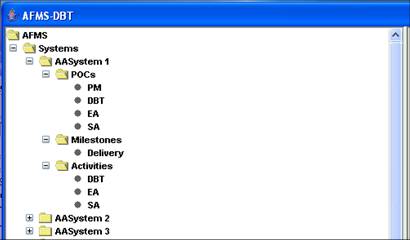
- Same architecture reused for another client to define same type of tree
as navigational aide
- Use JClient version of the user interface
- To implement change, no code in the user interface or middle tier had
to be modified.
- Database had to be updated to handle the new tree structure and
required functionality
|
|
23
|
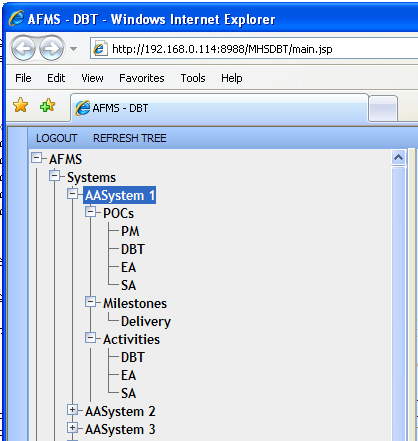
- After building tree in JClient, a web-based implementation of the
application was requested.
- Typically, going from thick client to web application entails a full
rewrite of the entire system.
- In this case, only necessary to rewrite the UI renderer for both tree
and screen components to work in a JSP/JavaScript technology stack.
- None of the screen definitions, tree definitions, or business logic had
to be modified to support this new requirement.
- Development continued using the JClient implementation while another
development team created a JSP/JavaScript version of the application in
a matter of weeks.
- After the web version was delivered, no integration or migration was
necessary.
|
|
24
|
|
|
25
|
- Application development approach outlined in this paper is still a work
in progress.
- It has changed the way in which we think about application design,
development, and how the process can be improved.
- After using this architecture on several projects, the following
advantages were observed:
- 1) Reduced interdependence between UI, middle tier, and database
- 2) Technology stack-independent specification
- 3) Smaller network footprint
- 4) Faster load times
- 5) Centralization of business logic
- 6) Faster development times
|
|
26
|
- John Rydzy – jrydzy@dulcian.com
- Dulcian website - www.dulcian.com
|

 Notes
Notes