Notes
Slide Show
Outline
1
J2EE Co-existing with
.NET and SQL Server
2
The Problem
  • .NET & J2EE environments exist within the same organization
  • Oracle & SQL Server databases exist within the same organization.
  • How do we deal with this situation?
3
J2EE
  • Rich environment
  • Basis of Oracle’s Project Fusion
  • Complex
  • Hard to learn
  • Evolving
  • Expensive talent


4
.NET
  • Microsoft environment
  • Less rich (not Model-View-Controller)
  • Easier to learn
  • Environment of choice in many organizations
  • Cheaper talent
  • Can’t be ignored
5
SQL Server
  • Microsoft DBMS
  • Catching up with Oracle
  • OK for most applications
  • Can’t be ignored
6
Can these systems
work together?
  • Can a JDeveloper ADF/J2EE application running on Oracle be easily made to work with SQL Server?
  • Can a J2EE application work with .NET?
  • Can you port an Oracle application to SQL Server?
  • If you have both J2EE and .NET applications running against the same database (either Oracle or SQL Server), can you make those applications talk to each other?


  • Not as easy as you would hope.


7
Case Study
  • The problem:
    • Insert data into the database
      • 1. Users fill out on screen forms (IBM/PureEdge).
      • 2. The data is extracted to an XML file.
      • 3. The database is updated.
    • Retrieve data from the database
      • 1. Data is extracted from the database.
      • 2. The XML file is populated.
      • 3. The file is passed to the client.
      • 4. The on-screen form is populated.
8
Existing Architecture
(2 versions)
  • Oracle DBMS
    • Rules-based architecture
      • Oracle repository
      • Forms Repository Manager
      • PL/SQL code generator
        • Written in PL/SQL
        • Generates PL/SQL
    • Thick-client web application
      • Blank forms are on client.
  • XML Data storage
    • Rules-based architecture
      • Same rules repository
        • Generates Java code
      • Same user interface
9
Proposed Architecture
  • SQL Server database
  • SQL Server-based rules repository
    • Same structure
    • Web-based (JSP/Struts) Repository Manager
    • Java generator
  • Thin-client architecture (.NET)
  • Leave XML generation in J2EE environment
  • Project had to be completed in 6 weeks.
10
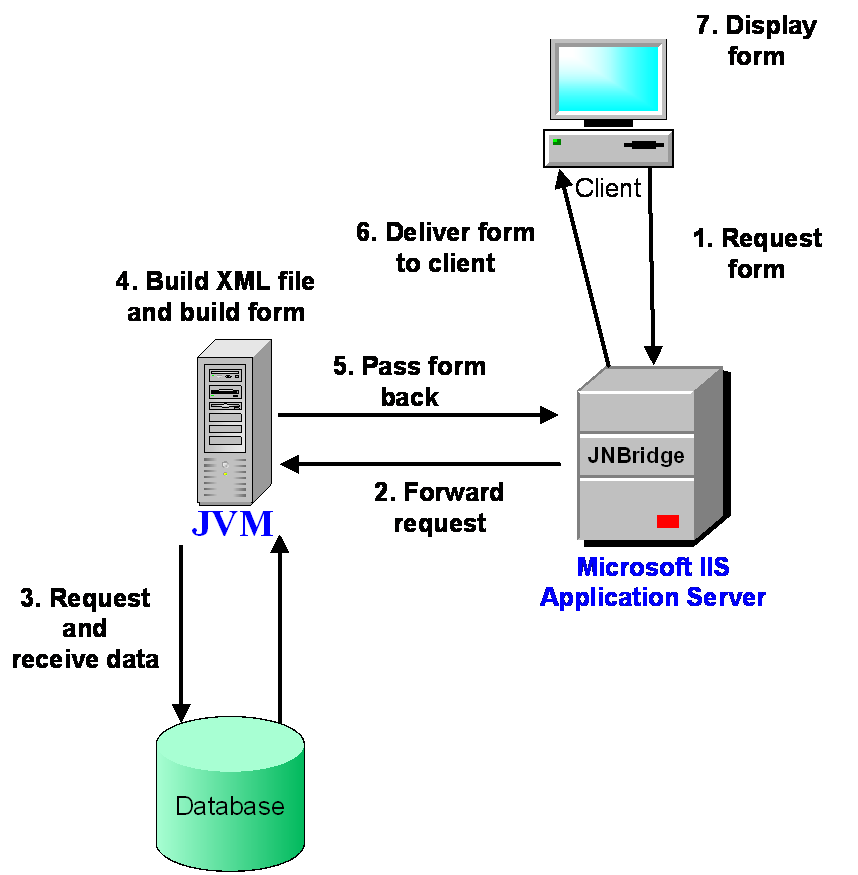
Overall process
11
SQL Server Issues
  • Problems to overcome:
    • 1. The SQL Server development culture is not as sophisticated.
    • 2. SQL Server does not include a CONNECT BY clause to support recursive structures.
      • No industry standard workaround
    • 3. SQL Server does not include sequences.
      • No industry standard workaround
  • Annoyances to deal with:
    • SQL Server has an 8,000 character limit per record.
    • No PL/SQL
    • No casting collections to tables
    • INSTEAD OF trigger views are new.
12
SQL Server Solutions
  • Primary key sequences
    • Use SQL Server identity columns (auto-populate numeric columns)
    • Use identity columns like sequences
  • CONNECT BY problem
    • Use 7-level self-join
  • 8,000 character limit
    • Remove all VARCHAR2(4000) fields
  • No PL/SQL
    • Move all logic to the middle tier
    • Avoid SQL Server scripting
13
Porting a J2EE Application
to SQL Server
  • Add JDBC to SQL Server driver (from Microsoft website).
  • JDeveloper wizards don’t work.
    • Pointed to an Oracle database
  • To make everything work, refactor for primary keys.
14
Making J2EE talk to .NET
  • Two different worlds
    • .NET won’t run on OAS.
    • Java won’t run on IIS.
  • Place both application servers on the same machine
    • Sounds wrong
    • Won’t scale
  • Make the two application servers communicate
    • Use a web service?
      • Slow, clumsy
    • Use JNBridge?
      • Worked well, scaled well
15
JNBridge
  • Searched long and hard for J2EE/.NET integration path
    • Books, articles
  • Need to register classes to call in JNBridge
  • JNBridge generated DLL
  • Reference DLL in .NET code
  • JNBridge has its own JVM or can call Java on a different machine.
16
Microsoft IIS
  • Basic out of the box setup
  • No extra setup required
17
Java on the client
  • As forms were opened on the client...
    • Extract data
    • Call a web application
  • Form product (IBM Workplace Forms - formerly PureEdge) only ran Java
  • Needed JVM on client machines
18
Conclusions
  • Making the two environments and databases work together can be done....BUT
    • It takes a long time to work through the details
  • SQL Server is annoying
    • No sequences
    • No CONNECT BY
    • 8,000 character limit
    • No casting of collections
  • .NET and J2EE will not work well together
    • Using a web service is OK but slow
    • Use JNBridge for transaction-level work
19
The J2EE SIG
  • Co-Sponsored by:


20
About the J2EE SIG
  • Mission: To identify and promote best practices in J2EE systems design, development and deployment.
  • Look for J2EE SIG presentations and events at national and regional conferences
  • Website: www.odtug.com/2005_J2EE.htm
  • Join by signing up for the Java-L mailing list:
    • http://www.odtug.com/subscrib.htm
21
J2EE SIG Member Benefits
  • Learn about latest Java technology and hot topics via SIG whitepapers and conference sessions.
  • Take advantage of opportunities to co-author Java papers and be published.
  • Network with other Java developers.
  • Get help with specific technical problems from other SIG members and from Oracle.
  • Provide feedback to Oracle on current product enhancements and future product strategies.
22
Share your Knowledge:
Call for Articles/Presentations
  • Submit articles, questions, … to
  • IOUG – The SELECT Journal            ODTUG – Technical Journal
  •           select@ioug.org                                  pubs@odtug.com
23
Dulcian’s BRIM® Environment
  • Full business rules-based development environment
  • For Demo
    • Write “BRIM” on business card
  • Includes:
    •  Working Use Case system
    • “Application” and “Validation Rules” Engines
24
Contact Information
  • Dr. Paul Dorsey – paul_dorsey@dulcian.com
  • Dulcian website - www.dulcian.com