|
1
|
|
|
2
|
- Way to allow multiple systems to communicate and interact with each
other
- Enable data to easily flow through many computers across numerous
networks.
|
|
3
|
- Confidentiality: Only authorized users are able to view the data in its
original form.
- Integrity: The data has not been altered during transit and is identical
to the data transmitted.
- Authenticity: Recipient can confirm or deny that data.
|
|
4
|
- Problem:
- Transmit secure information about a customer from one computer to
another.
- Target computer publishes a web service called by the source computer.
- Source computer extracts customer information to store in an XML data
file.
- Same information is shown to the customer on screen using a form
representation product originally built by PureEdge (acquired by IBM).
- Using a signature pad, users sign the document and the signature
portion of the document is extracted to a PDF.
- When the web service is called, both the XML data file and the PDF
signature page were passed to the web service.
- Information being transmitted needed to be highly secure
- Information consisted of legal documents
- Important that information not be intercepted or fraudulently
manipulated.
|
|
5
|
- 1. Front-end application being used had hundreds of users worldwide, but
all calls to the web service were made by a single source application
server.
- 2. Specific permission granted to source application server to bypass
proxy server and directly call web service.
- 3. Both source and target servers only existed within the .mil domains
and were invisible to normal Internet traffic.
- 4. Specified path routed through several firewall devices was set up
between the source and target servers.
|
|
6
|
- 5. To prevent interception, manipulation, or retransmission of web
service calls, clock times on the source and target computers had to be
synchronized.
- Web service call with an out-of-date timestamp is automatically
rejected.
- 6. Data was encrypted prior to being passed to the web service.
- Executable version of software was passed to the source computer
development team .
- Source code was not distributed.
- 7. Used standard user name/password authentication
- 8. Used standard HTTPS secure socket transmission
- 9. Digital signatures were installed on the source computer in order to
further authenticate the web service call.
|
|
7
|
- Difficult to establish routing through several firewalls
- All required valid declaration of the source IP address for successful
transmission
- Needed to:
- Determine appropriate firewalls
- Identify the right resource with knowledge about opening the firewall
- Get permission to open the firewall
- Get permission to bypass proxy server on the source side
- Get permission for new digital certificates
- Make hardware changes
- Lessons learned:
- Budget several weeks of time to establish connectivity between the
source and target computers in order to handle all communications
securely.
- Challenge to synchronize source and target computers:
- In large computing facilities, this function is usually centrally
managed.
- Two different time managers for the source and target systems.
- Periodically one of the systems ends up being off by several minutes
which then invalidates all of the web service calls.
|
|
8
|
- Security measures can be placed at different levels, depending upon a
host of factors:
- System architecture
- Business needs
- Capabilities of the client system
|
|
9
|
- Deals with securing the actual means of transmitting the information.
- In addition to its use with web services, it is also used for most
secure Internet traffic.
|
|
10
|
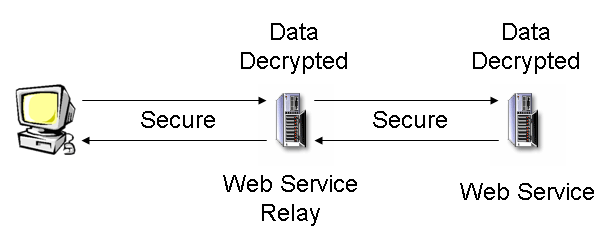
- Encrypt entire transmission when sending and decrypt it using a web
server at its arrival point.
- Simplest mechanism is to transmit the message using HTTP over SSL or
HTTPS.
- Sufficient for most business needs.
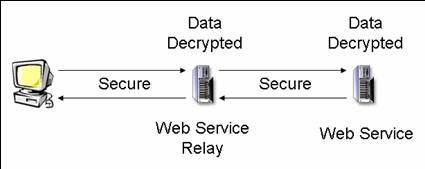
- Problem in certain architectures where a single transmission needs to be
processed by intermediary servers.
- Data is not secure while it is being processed on either server,
leaving it open to possible “eavesdropping.”
|
|
11
|
|
|
12
|
- Limit traffic to the web service.
- Block all traffic to the server except that which originates from IP
addresses of known users of the web service.
- Ensure that only authorized users will be able to access the system.
- Limit exposure of the server itself to Internet-based attacks such as
denial of service (DOS).
- If calling through a proxy/firewall
- Server request appears to originate from the proxy server
- Must enable proxy IP address
- Big security hole
|
|
13
|
- Web Services Security (WS-Security) offers greater flexibility for
encrypting, authenticating, and signing messages.
- Simple Object Access Protocol (SOAP) used in web service communication
- Allows for encrypting and signing of different blocks of the message
- Includes ability to add tokens identify the sender
- Combination of features allows web service messages to fulfill security
requirements for a host of environments and situations
|
|
14
|
- Calling a web service via HTTPS encrypts the entire message during
transit.
- Use encryption for individual elements of the web service message
itself.
- When an intermediary server receives the message, the sensitive data in
that message is still encrypted by other means.
- WS-Security protocol allows individual XML blocks in the SOAP message to
be encrypted using different keys.
- Allows messages to be processed by multiple servers, with each server
capable of accessing only the information that is intended for it.
- Remaining encrypted data will be unreadable.
|
|
15
|
- Symmetric or single-key encryption utilizes a single key which all
parties wishing to communicate securely must possess.
- Key scrambles data at source
- Same key used to descramble at target
- Single key is secret
|
|
16
|
- Private key is held by the party who receives data.
- The public key is freely given to anyone wishing to send encrypted data
to the private key holder.
- Only receiver must keep key secret.
|
|
17
|
- Ensure integrity of transmitted data:
- Use private key and a public key
- Private key used to sign a block of data
- Public key used to determine whether the data has been modified
- Verifies that no signed data has been changed during transit and
rejects any requests that have been modified.
- Excellent method of establishing the authenticity of users and the
integrity of messages.
- May not be usable in all system architectures.
- Each user of the web service must have a digital certificate and the
means to add a signature.
- The web service must know in advance which digital certificates it can
trust.
|
|
18
|
- Less intrusive and somewhat less secure means of verifying the
authenticity of web service users
- Security tokens placed within the message by the sender
- WS-Security protocol allows for security tokens
- Allows senders to specify a simple username and password to include
with their message.
- The web service compares these tokens against a set of trusted tokens
to authenticate and authorize user requests.
- Can also attach binary and XML tokens to the message in addition to
simple username and password fields.
- Additional means (signing tokens) should be used to ensure the integrity
of the tokens
|
|
19
|
- Use can limit exposure to variety of different attacks.
- If predefined amount of time has passed between creation of web service
call and its receipt, something malicious may have occurred.
- If the original message contained a timestamp, the next time that the
message was transmitted it would most likely be expired and rejected.
- Web service could also log the timestamp of each request to prevent any
requests with the same timestamp for a particular user.
- Additional overhead of requiring both sender and receiver to synchronize
clocks in order to limit incorrect rejections.
- Hindrance has been lessened in recent years as more and more systems
automatically synchronize their clocks to centralized servers.
|
|
20
|
- All of the security measures discussed are irrelevant if the system
hosting the web services is not itself secure.
- The servers should be housed in a secure location with restricted
access.
- The security of the private encryption/signature keys should be very
tightly controlled.
- Even public keys should be transferred securely.
|
|
21
|
- Web service security is a complex multi-faceted issue that combines
standard Internet security issues along with the extended security model
for web services themselves.
- To ensure web service security, keep the following in mind:
- Confidentiality
- Transmit over HTTPS
- Encrypt message parts
- Integrity
- Authenticity
- Filter firewall traffic
- Sign message elements
- Require security tokens (username/password, etc.)
- Timestamp messages
- Don’t take difficulties associated with setting up secure services for
granted.
- The politics of security are often more difficult than the technical
challenges.
- Developers should allow weeks of time to adequately support a secure
environment.
|
|
22
|
|
|
23
|
- Mission: To identify and promote best practices in J2EE systems design,
development and deployment.
- Look for J2EE SIG presentations and events at national and regional
conferences
- Website: www.odtug.com/2005_J2EE.htm
- Join by signing up for the Java-L mailing list:
- http://www.odtug.com/subscrib.htm
|
|
24
|
- Learn about latest Java technology and hot topics via SIG whitepapers
and conference sessions.
- Take advantage of opportunities to co-author Java papers and be
published.
- Network with other Java developers.
- Get help with specific technical problems from other SIG members and
from Oracle.
- Provide feedback to Oracle on current product enhancements and future
product strategies.
|
|
25
|
- Submit articles, questions, … to
- IOUG – The SELECT Journal
ODTUG – Technical Journal
- select@ioug.org
pubs@odtug.com
|
|
26
|
- Full business rules-based development environment
- For Demo
- Write “BRIM” on business card
- Includes:
- Working Use Case system
- “Application” and “Validation Rules” Engines
|
|
27
|
- Dr. Paul Dorsey – paul_dorsey@dulcian.com
- Dulcian website - www.dulcian.com
|

 Notes
Notes