|
1
|
|
|
2
|
- What is the best way to build an application?
- Is J2EE better than .NET?
- Where does the business rules approach fit in?
- Should business rules be implemented in the database or the middle tier?
- Use Model 1 (traditional) or Model 2 (Model-View-Controller)
architecture?
- Waterfall or Agile techniques in development?
|
|
3
|
- Need a framework for talking about what an application is.
- Zachman framework not adequately detailed for discussing questions on
previous slide.
- Framework presented here is a refinement of rows 3 (System Model -
logical) and 4 (Technology Model - physical)
- Further define what is meant by the logical and physical specification
of a system.
|
|
4
|
- What are we modeling?
- Computer things
- Real-world things
- Erwin and Oracle Designer help build systems.
- Tables, columns and foreign key constraints.
- Only helped to solve a small percentage of the problems.
- Data models do not provide complete information about the objects they
model.
- no process flow
- No information about how applications interact with objects.
- Missing information such as “Departments with employees must have at
least one manager”
- Little UI information
- Modeling grammars limit themselves to what they generate.
|
|
5
|
- Suffers from a code-centric philosophy.
- Designed by object-oriented (OO) programmers with the goal of creating
OO programs.
- IBM’s Rational Rose, UML Data Modeler or Oracle’s JDeveloper modeling
tool can be used to generate Java classes.
- Tools model Java classes or physical system architectures instead of
what the system is supposed to do.
- Grammar is focused on specifying the code, but it does not describe the
system from a logical perspective.
|
|
6
|
- Generate directly from the logical model
- Make a complete logical model
- Only use technology specific information where necessary
- Presentation describes the structure of a formal grammar designed to
fully articulate a system, independent of any technology.
|
|
7
|
- Pros
- User-friendly
- User participation
- Faster, cheaper
- Maintaining business logic is much easier since all business rules are
stored in a repository.
- Easier and swifter response to changes in technology
- Generate 99% of system
- Cons
- Requires discipline and architectural approach
- Needs designers who are familiar with a rules-based way of thinking.
|
|
8
|
- I. System
- A. Logical
- 1. Object
- a. Structure
- b. Process
- c. Validations
- 2. UI
- a. Model
- i. Structure
- ii. Binding to objects
- b. View
- i. Structure
- ii. Logic
- iii.Presentation
- c. Controller
|
|
9
|
- First level of the taxonomy
- Systems and the interactions between them
- Traditional (pre-SOA) practice of providing database links between
systems is intellectually unsound.
- Systems should be isolated from the ways in which they communicate.
- Many systems can be isolated into several systems that have their
inter-system communication separated out.
- Example: Human Resources system
- Users fill out images of paper forms on their computers that are then
uploaded into the database.
- Each form can be considered as an isolated system that generates an
XML file.
- These files are then sent to the main system for processing. In this way, the logic of the forms
is isolated from the rest of the system.
|
|
10
|
- Not Designer-like Logic/Physical
- Specify logical rules at the logical level
- ONLY additional rules at Physical level
- For example, in data model
- Logical -- Class, attribute, association
- Physical – Generation algorithm, schema organization.
- Rules are the system – mostly
|
|
11
|
- Few product architectures (even ones with an expressed “business-rules
based” philosophy) embrace this idea.
- Most products ignore this idea entirely and straddle the fence.
- JDeveloper
- ILOG
- Fair Isaac’s Blaze Advisor
- Code generators
- Tools that cater explicitly to the system architect separate loosely
coupled logical and physical
- Oracle Designer
- IBM’s Rational Rose
|
|
12
|
- Specify object rules first
- Only specify ADDITIONAL UI rules
- Object rules
- Everything independent of representation
- Structure, process, data validation
- UI rules
- Display order
- What auto populates when I open the application
|
|
13
|
- Everything about the objects
- Structure
- Process
- Data Validation
- Where most of the design of the system takes place
- Should be the core of thinking about application development.
- Traditionally business rules about the objects are not even captured
coherently let alone coded so they are clearly attached to the objects.
|
|
14
|
- Object rules are not enough to generate a system
- Possible to generate an entire default user interface based solely upon
knowledge of the associated objects.
- What is generated will not be particularly user-friendly.
- Sample object rules
- What areas of the screen are automatically populated when the screen
opens
- Whether or not rules are validated when tabbing out of a field
|
|
15
|
- Object rules can be subdivided into:
- Structural
- Process
- Data Validation
- Rules by their nature do not divide into these three classifications.
- For any given rule, most convenient to articulate it using one
particular mechanism
- Most rules can be articulated using more than one mechanism.
|
|
16
|
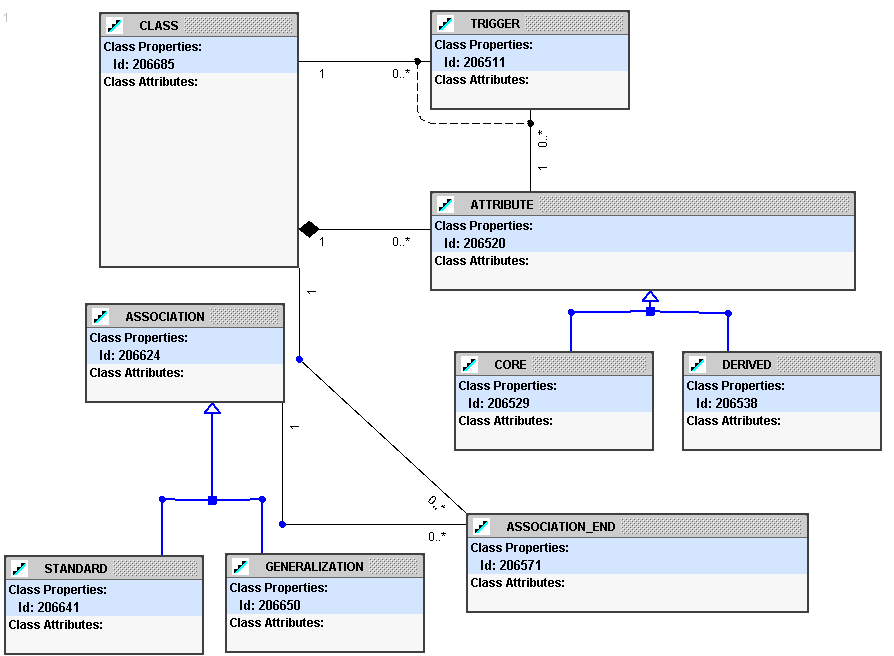
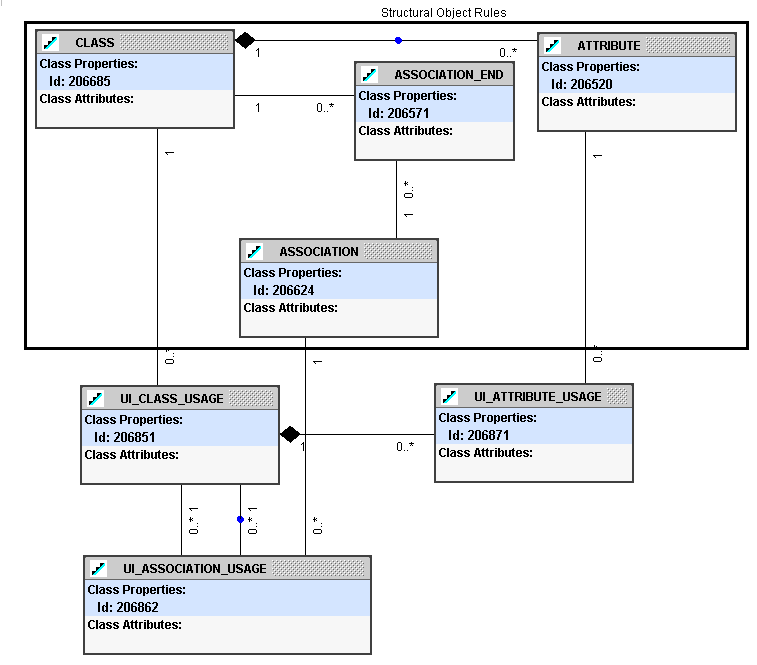
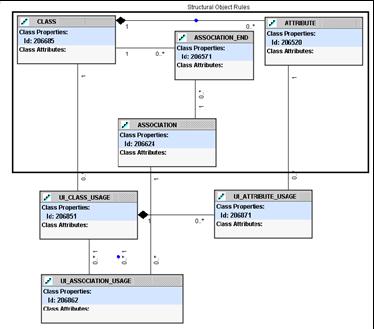
- Describe the static nature of objects in the system.
- What are the objects of interest?
- What are the attributes/associations associated with them?
- UML Class diagrams (with some extensions) are better suited for
structural modeling than ERDs.
- Structural rules include a much broader range of information than that
ERDs:
- Derived attributes
- Objects defined using other objects (to generate database views)
- Audit, security, and history requirements
- Default object display
- Triggering events based on Insert, Update, and Deletion of objects or
attributes
|
|
17
|
|
|
18
|
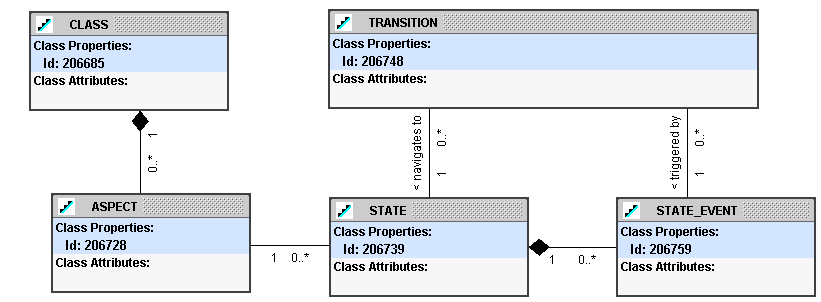
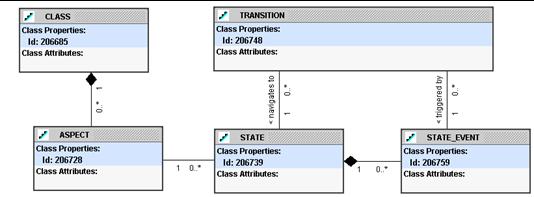
- Process rules define the process flow of an object from one state to
another
- Objects have more than one state
- Financial health
- Physical health
- Declarative rules won’t work
- Too many rules (10,000 –
100,000)
- Rules interact
- Traditional State Transition Engine (STE) diagrams or flowcharts are
similarly hard to manage.
- Flowcharts are often harder to read than the program code itself.
|
|
19
|
- Solution to making an STE work is to embed some logic in the state
itself.
- Allows the number of states to remain manageable.
- View the state from the users’ perspective as being a desk in an office
with an inbox and an outbox.
- Richer object states drastically reduce the required number of states
used to describe a process.
- Formal structure used is to add the idea of an “event” on a state (like
a database trigger on a table).
- When event is triggered, actions can be executed.
- Rules can be attached to an event to prevent it from occurring.
- The process flow defines the allowable states for a particular class of
objects.
|
|
20
|
|
|
21
|
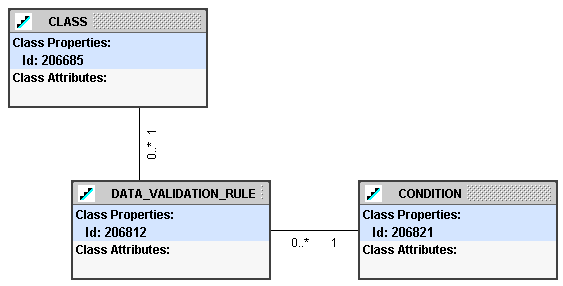
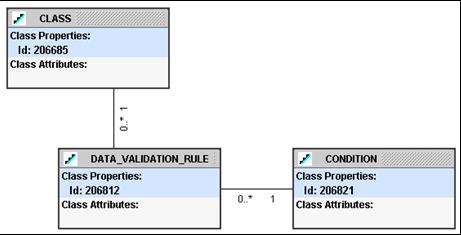
- Is the object valid in this context and what should be done if it isn’t?
- System may contain hundreds of data validation rules.
- Always enforced or contingently based upon some condition or state?
- May only require looking at the object being validated or accessing
other objects.
- Failure may trigger warning or prevent data modification.
|
|
22
|
- Difficulty is in creating a grammar to help specify the rules.
- Natural language is not precise enough.
- Solution is to place the rules at the object level but support an
Object Constraint Language (OCL)-like syntax that allows you to
validate across classes.
- Rule to say that a department must have at least one employee (in the
standard EMP/DEPT 1-to-many model) would be written as:
- This grammar can be easily extended to support 99% of all rules
encountered.
|
|
23
|
|
|
24
|
- Once the object rules are collected, there are some additional rules
required to specify the UI.
- Use MVC
- Model
- Structure
- Binding to objects
- View
- Structure
- Logic
- Presentation
- Controller
|
|
25
|
- Just point to elements in Object.structure model
- Structural rules at the object level are quite sophisticated:
- Standard views
- Views that are dynamically altered or generated
- Does not preclude a “thick” UI model level for implementation
- Structure of the UI model should be defined at the object-level
|
|
26
|
|
|
27
|
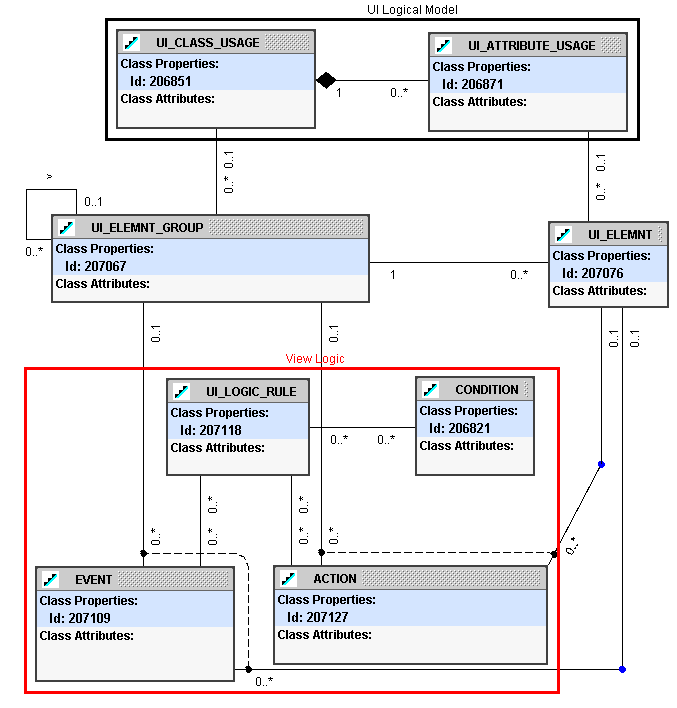
- View Rule types
- Structural (the elements and how are they grouped)
- Simple
- Define the UI elements (fields, buttons, etc.) and how they are
grouped and bound to the UI model
- Logical (what happens when a screen opens, or a button is pressed)
- Complex
- Event-Condition-Action ECA
- Presentation (how and where the elements are displayed).
- Mainly governed by style sheet/generator logic
- Order, placement
|
|
28
|
|
|
29
|
- (Aren’t
we done YET????)
- STE-style process flow for pages
- Has not been built yet
|
|
30
|
- Mainly a generator thing
- Some technology specific rules
- Have to decide on an implementation strategy
- How to do UI model objects?
- UI presentation technologies are very different (moderated by thick DB
approach)
|
|
31
|
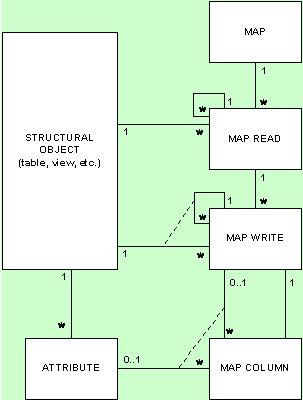
- Defined by rules associated with data migration (ETL), web services and
similar situations where one set of objects must be mapped to a second
set.
- System interaction rules can also define how the various systems map to
the virtual operational data store (VODS).
- Typical mapping support
- Take one source object class at a time and describe how it can be
transformed to a target class using a process flow metaphor.
- Informatica and Oracle Warehouse Builder use this approach.
- Alternative method
- Describe complex sets of information in a master-detail structure and
then describe how to map that complex structure.
- Does not require a process flow
- Usually results in code generation that runs more efficiently.
|
|
32
|
|
|
33
|
- The taxonomy can be used as a way to talk about applications,
application development environments and development architecture.
- “Let’s first talk about systems then discuss how to make them
integrate”
- “That isn’t an object rule. That is a UI thing. We are focusing on the
object rules right now.”
- This presentation serves as a foundation for the architectural
discussion surrounding application development.
|
|
34
|
|
|
35
|
- Mission: To identify and promote best practices in J2EE systems design,
development and deployment.
- Look for J2EE SIG presentations and events at national and regional
conferences
- Website: www.odtug.com/2005_J2EE.htm
- Join by signing up for the Java-L mailing list:
- http://www.odtug.com/subscrib.htm
|
|
36
|
- Learn about latest Java technology and hot topics via SIG whitepapers
and conference sessions.
- Take advantage of opportunities to co-author Java papers and be
published.
- Network with other Java developers.
- Get help with specific technical problems from other SIG members and
from Oracle.
- Provide feedback to Oracle on current product enhancements and future
product strategies.
|
|
37
|
- Submit articles, questions, … to
- IOUG – The SELECT Journal
ODTUG – Technical Journal
- select@ioug.org
pubs@odtug.com
|
|
38
|
- Full business rules-based development environment
- For Demo
- Write “BRIM” on business card
- Includes:
- Working Use Case system
- “Application” and “Validation Rules” Engines
|
|
39
|
- Dr. Paul Dorsey – paul_dorsey@dulcian.com
- Dulcian website - www.dulcian.com
|

 Notes
Notes